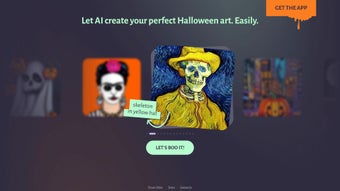

Download ArtBot ai – AI‑Powered Halloween Art Generator, Free & Secure
Introduction: Why a Halloween‑Focused AI Art Tool Matters
The digital age has turned seasonal marketing into a year‑round race, and Halloween is one of the most visual, share‑heavy holidays on the internet. Brands, influencers, and everyday users all look for quick ways to add a spooky flair to their content without hiring a graphic designer or spending hours learning complex software. This is where ArtBot ai steps in.
By leveraging state‑of‑the‑art generative AI, the platform transforms a simple selfie into a fully‑themed Halloween masterpiece in seconds. The service is completely web‑based, meaning there is no bulky installer, no licensing hassle, and no need to worry about compatibility issues across devices. Whether you are crafting a promotional banner for a boutique costume shop, spicing up a personal Instagram story, or preparing a themed newsletter for a community group, ArtBot ai offers a fast, secure, and cost‑effective solution.
Its privacy‑first approach—encrypting uploads and automatically deleting files after processing—addresses the growing concerns around data security that many users have with cloud‑based image tools. Moreover, the free tier removes financial barriers, allowing anyone to experiment with AI‑driven creativity during the Halloween season and beyond. In the sections that follow, we’ll explore the core features, walk through the installation‑free workflow, examine system compatibility, weigh the pros and cons, answer the most common questions, and finally give you a clear verdict on whether ArtBot ai is the right tool for your spooky creative needs.
Features Overview and Seamless Installation‑Free Workflow
- AI‑driven image synthesis that merges selfies with Halloween graphics.
- Extensive library of themed assets: pumpkins, bats, cobwebs, skulls, and more.
- Customizable output size (portrait, square, landscape) and opacity controls.
- One‑click download in high‑resolution PNG or JPEG formats.
- Secure, server‑side processing with automatic data deletion after 24 hours.
- Responsive web design – works on desktop browsers and mobile devices.
- Free tier for unlimited personal creations; optional premium plan for priority processing.
Step‑by‑Step Guide: Getting Started Without Installing Anything
1. Visit the website: Open any modern browser—Chrome, Edge, Safari, or Firefox—and go to artbot.ai. The landing page immediately presents a clean interface with a prominent “Upload Photo” button.
2.
Create an account (optional): While you can generate artwork as a guest, registering an account stores your favorite style presets and gives you access to the premium asset packs when you decide to upgrade.
3. Upload your selfie: Click “Upload Photo,” select a well‑lit portrait from your device, and watch a quick preview appear. The AI runs a facial detection routine to ensure the subject is centered for optimal blending.
4.
Select Halloween elements: Browse the themed gallery on the right side. Each icon—whether a glowing jack‑o‑lantern, a fluttering bat, or a misty graveyard backdrop—can be added with a single click. You can stack multiple elements, and the UI instantly shows how they interact with your portrait.
5.
Adjust settings: Use intuitive sliders to modify canvas size, switch between portrait, square, or landscape orientations, and fine‑tune opacity for each layer. Real‑time thumbnails update as you move the sliders, giving you immediate visual feedback.
6. Generate & download: Press the “Create Art” button.
The AI engine typically finishes rendering within 5‑10 seconds, even on slower connections. Once the final image is ready, a “Download” button appears, allowing you to save the file locally in PNG or JPEG.
7. Share instantly: Direct sharing icons let you post the finished artwork to Instagram, Facebook, Twitter, or copy a shareable link.
No extra steps or third‑party apps are required.
Because the entire process lives in the browser, you never need to download additional plugins, install drivers, or worry about operating‑system restrictions. Updates to the asset library, AI model improvements, and new seasonal packs are rolled out automatically on the server side, so you always have the latest features without lifting a finger. This installation‑free design not only simplifies the user experience but also ensures that the tool remains lightweight, fast, and accessible on any device that can run a modern web browser.
System Compatibility, Performance Metrics, and Real‑World Pros & Cons
ArtBot ai is a pure web application, which means it runs on any operating system that supports up‑to‑date browsers. It has been tested on Windows 10/11, macOS Ventura, various Linux distributions (Ubuntu, Fedora), as well as mobile platforms like iOS Safari and Android Chrome. The minimum technical requirements are a stable internet connection of at least 3 Mbps and JavaScript enabled in the browser. No additional plugins, Flash, or Java are required, and the site automatically detects the best rendering mode for the user’s device, delivering a consistent experience across desktop, tablet, and smartphone screens.
Pros: What Users Love About ArtBot ai
- Intuitive UI – even users with zero design experience can create striking Halloween art.
- Fast processing – AI renders images in seconds, ideal for last‑minute campaigns.
- Privacy‑first – uploads are encrypted and auto‑deleted after processing.
- Responsive design – works equally well on laptops, tablets, and smartphones.
- Free tier offers unlimited personal creations, making it budget‑friendly for small businesses.
- Automatic updates – new assets and AI improvements are delivered without user intervention.
- One‑click social sharing accelerates content distribution on popular platforms.
Cons: Areas Where the Tool Could Improve
- No batch processing – each image must be generated individually, which can be time‑consuming for large projects.
- Lacks advanced editing tools (e.g., layer masks, vector output) that professional designers expect.
- Real‑time preview is limited to static thumbnails; users cannot see live changes while adjusting opacity.
- Premium features (priority rendering, higher resolution) require a subscription.
- Currently focused on Halloween; broader seasonal themes are still in development.
- Internet dependency – offline use is not possible, which may be a limitation in low‑bandwidth environments.
Frequently Asked Questions
Is ArtBot ai really free to use?
Yes, the core Halloween art generator is completely free. Users can create unlimited personal artworks without paying. A paid “Pro” plan is optional and provides faster processing, higher‑resolution downloads, and priority support.
How does ArtBot ai protect my uploaded photos?
All uploads are transmitted over HTTPS and stored temporarily on encrypted servers. Files are automatically deleted 24 hours after processing, ensuring no long‑term retention of personal data.
Can I use ArtBot ai on my mobile phone?
Absolutely. The platform is fully responsive and works on iOS Safari and Android Chrome. The same upload, customization, and download workflow is available on mobile devices.
What image formats does ArtBot ai output?
Generated artwork can be downloaded as high‑resolution PNG or JPEG. The format is chosen automatically based on the selected opacity and size, but users can toggle between the two before downloading.
Will ArtBot ai support other holiday themes in the future?
The development roadmap includes expansions for Christmas, Valentine’s Day, and other major events. Existing users will receive new themed asset packs automatically as they are released.
Do I need a powerful computer to run ArtBot ai?
No special hardware is required. Because all AI processing happens on the server side, even low‑end laptops or older smartphones can generate artwork as long as they have a stable internet connection and a modern browser.
Final Verdict & Call to Action
ArtBot ai delivers exactly what its tagline promises: a fast, secure, and user‑friendly way to generate personalized Halloween artwork. While it doesn’t replace professional design suites for large‑scale campaigns, its AI engine removes the technical barrier for marketers, influencers, and casual users who need a quick, eye‑catching visual. The free tier is generous, the privacy model is solid, and the responsive design ensures you can create spooky graphics on the go. If you’re looking to spice up your social feeds, email newsletters, or event invitations without learning Photoshop, ArtBot ai is a compelling choice. For power users who need batch processing or vector output, consider pairing the tool with a traditional graphics editor, or upgrade to the premium plan for faster renders and higher resolution files.
Ready to unleash your inner Halloween artist? Download ArtBot ai now and start crafting hauntingly unique portraits in seconds. Join the community of creators who are already turning ordinary selfies into seasonal sensations, and watch how a few clicks can transform your content from bland to bewitching.



.png)



